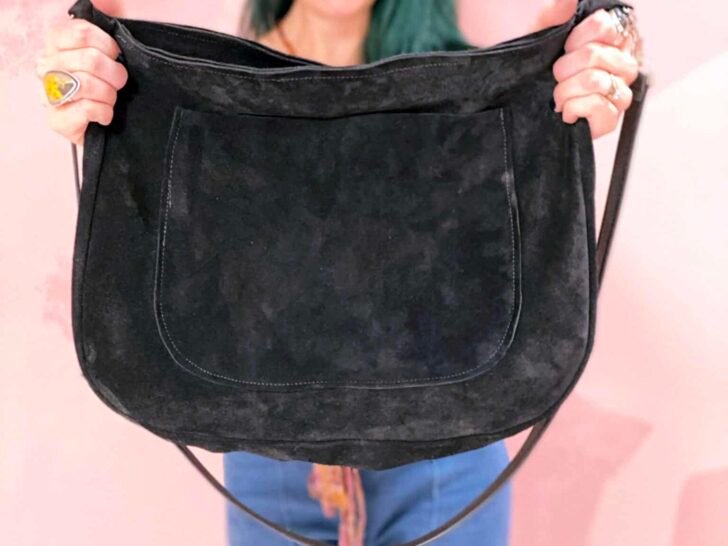
The Easiest Printable Leather Bag Patterns
Hello friends! With autumn upon us, I’ve celebrated the season by making quality, new pieces for my wardrobe. So today I’m so excited to share this leather handbag pattern with you! The best part of this tutorial is that I designed it to be made on any at-home sewing machine.
You can print and download this pattern from my sewing pattern website here.
That’s right! I designed this pattern to be simple, straightforward, and eliminate bulk in your project (which can be hard for sewing machines to handle.) Read on for all of my quick tips and tricks to working with leather without the overwhelm!

Not long after I began sewing, I fell in love with the idea of making beautiful handbags and working with leather sewing patterns. I imagined myself carrying around the perfect handmade leather tote that garnered compliments everywhere I went. However, the idea of actually making that dream bag seemed totally intimidating and felt like the kind of project only reserved for experienced sewists.
Truth be told, I became so intimidated to even start and it took me years to face my fear and purchase my first sheet of leather. The good news is, after several years (and creating a career out of regular sewing,) I’ve learned some really helpful tips that make working with leather and other tricky fabrics so much easier and more attainable for everyone. You can check out my complete guide to sewing leather by clicking here.

To use this leather handbag pattern, you’ll also need a few basic sewing supplies. I’ve outlined each one below and included shoppable links for your convenience. Since we’re working with unique fabric for these leather bag patterns, some of our supplies may be different as well.

Video Tutorial:
Sewing Supplies List:
Basic Sewing Kit
A Basic Sewing Kit is important no matter what project you are working on. When you are just getting started, it can often be easiest to just buy a pre-made one. This Sewing Kit
Leather Sewing Machine Needles
When sewing with leather, be sure to use a fresh Leather Machine Needle

Leather Sewing Machine Thread
To hold heavy fabrics like canvas, leather, and suede together, you need a heavy-duty thread. It’s thicker and tougher than standard polyester and can hold your awesome project together while standing the test of time. Often we can be tempted to use Universal thread for our leather bag patterns but Universal Threads will break and snap throughout the process of making your project.

Walking Foot
In learning to sew leather, one of the biggest tools you will need is the correct presser foot. If you plan on working with leather or thick fabric often, I can’t recommend a Walking Foot

Quilting Clips
Another tool that makes sewing leather at home so much easier is having some binder or Sewing clips
How To Use This Leather Handbag Pattern

To make this leather handbag pattern, just print out the printable leather bag patterns here. Once the pieces are printed and taped together, we’re going to cut out the following pattern pieces:
- One Pocket Piece
- Two Purse Body Pieces
- Two Ring Tabs
- One Gusset Piece
- Two Purse Tops

When you are sewing leather with an at-home sewing machine, there are a few little tips to keep in mind. The first is to always use a walking foot on your leather bag patterns. It has an extra set of feed dogs it’s easier on your machine. Also, extend your stitch length to 3.5 or 4.0. Since every hole that you make and leather it’s going to be permanent, we’re going to keep those holes to a minimum. Finally, be sure you use a leather needle and test out your stitches with heavy-duty thread on a scrap piece of leather before working on your project.
Once your machine settings are ready, it’s time to sew the front pocket onto the front bag piece using the markings on this leather bag patterns as a guide. Adjust your needle so it’s as close to the raw edge of your pocket as possible but still allowing the extra feed dogs of your walking foot to really get a firm hold on your leather. Be sure to extend your stitch length to 3.5 or 4.0 to reduce excess punctures in your fabric and reduce tearing. Since leather doesn’t fray, we don’t need to finish the top edge of the front pocket whatsoever.
Note: For this part of the tutorial, we will be using sewing pins to hold your leather in place. In general (and for the rest of this project) we will be using quilting clips. If you don’t have quilting clips on hand, you can also use binder clips. We really want to reduce using sewing pins because they create puncture holes in your leather that are going to be permanent.

Now it’s time to install the gusset. When we’re putting the gusset on the front and our back purse pattern pieces, we’re going to be starting at the top edges. Make sure everything is lined up correctly before working your way down in the body of the bag. Holding everything in place with quilting clips.

Once the front of your bag is done, it’s time to flip your project over and repeat the process on the other side.

Now, it’s time to sew the body of your leather purse together. We’re going to be using a half an inch seam allowance and we’re also going to sell the purse tops to either end of year zipper.
When sewing your zipper, I like to put the right sides together. It creates a clean finish on the top edge and your purse zipper and should be able to slide up and down really easily.
Now to reduce bulk from the leather we’re going to make tiny triangular clips into the seam allowance of your leather. Just make sure that your only trimming at the curved edges of your bag and you’re not slipping into your threads. I like to use extra sharp scissors for the step. Make your way around the front and backside of your purse making sure that you were trimming all four edges before turning your back right side out.

From here your bag is really starting to take shape so let’s add our purse straps to start now to do this I just cut out my two ring tabs and slip them through a premade purse handle.
You can also recycle an old purse handle if that’s easier to. To sew it in place, we are just going to fold your ring tab through our handle, fold it in half, and then lining it up with the gusset marks of your bag.

From here you are just going to sew a little square on that top of your ring tab.
Now you could leave your project just like this and have a leather tote, or we can finish it off and make your bag into a really nice purse. We’ll do this by adding a top zipper! To do that, all we’re going to line up the purse top with the inside body and hold it in place with quilting clips. These stitches are going to be very visible so try to keep them as clean and as close to the top edge as possible.

And now you did it! You made your first awesome, totally practical leather bag. I really hope you guys and again to print this (and other) leather bag patterns, visit modernsewingpatterns.com